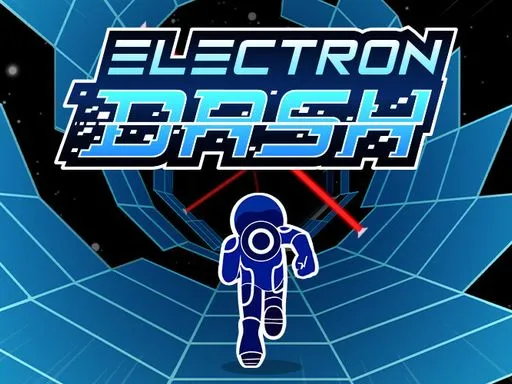
Electron Dash is a fast, neon 3D endless runner set inside a glowing space tunnel. You guide a tiny “electron” as it races forward automatically, and you survive by reacting at the right moment—jumping gaps, dodging laser traps, and dealing with unstable tiles that can vanish under you.
The goal is distance and score. You start, you run, and you try to beat your best run. That simple loop makes Electron Dash perfect for short breaks, because a full attempt can take seconds or minutes, not hours.
Instead of a flat road, the track wraps into a tube. You don’t just move left and right—you shift around the tunnel’s surface to line up safe landings. That rotating feel is the signature of Electron Dash, and it turns simple moves into a real timing challenge.
The style also matters. The tunnel is bright, clean, and “Tron-like,” which makes hazards easier to spot even when the speed rises.
Electron Dash is made to run in a web browser, so you can play instantly without installing anything. This is helpful on shared computers, school laptops, or devices where downloads are blocked. Because it is an HTML5 browser game, it can run on most modern devices and screen sizes.
If you want a clean, quick start, play Electron Dash on sand-crush.com. It drops you straight into the tunnel so you can focus on your score, not setup.
Electron Dash feels best with a keyboard, but it can also work on touch screens. If you are on a Chromebook or a basic laptop, keep the game window large and try to avoid running heavy apps at the same time. On mobile, rotate your phone to landscape so you can see the next platform sooner.
This game rewards precision, so smooth performance matters. Use a modern browser, close heavy tabs, and avoid battery saver mode if possible. If you notice stutter, refresh the page and try full screen. If your browser has a “hardware acceleration” option and it is turned off, turning it on can help on some devices.
The controls are simple, which is why the difficulty feels “honest.” When you fail, it is usually because of timing, not because you forgot a complex combo.
Most browser versions use:
Some players describe this as “rotating the tube,” but the result is the same: line up the next platform and jump cleanly.
On phones and tablets, the controls are often mapped to swipes and taps (for example, swipe left/right to change position and tap to jump). Playing in landscape mode can make the tunnel easier to read.
With practice, Electron Dash starts to feel less like chaos and more like a rhythm you can learn.
Electron Dash stays interesting because the tunnel keeps changing, but the main threats are consistent.
A smart way to improve in Electron Dash is to label the threat fast—“gap,” “laser,” or “weak tile”—then act. For lasers, move early so you don’t clip the edge. For weak tiles, treat them like hot plates: touch and go.
Many versions include collectible hearts. Hearts act like extra lives: if you make a mistake, you can sometimes respawn instead of ending the run right away. Hearts are worth grabbing, but don’t chase them into danger. A safe line usually beats a risky detour in Electron Dash.
Electron Dash is a browser-first HTML5 game that is published and distributed across many web game platforms. That “built to travel” approach helps explain why the same core version appears across lots of browser game collections.
The mix is simple: bright neon visuals, quick restarts, and a clear skill curve. Early runs teach the basics. Later runs test your focus at higher speed. That steady pressure is what makes Electron Dash so replayable: you always feel like you can go a little farther next time.
Electron Dash is commonly offered as a free browser game. On sand-crush.com, you can start playing right away with no download.
Often yes, but the feel depends on your screen size and touch controls. If you want the most precise movement in Electron Dash, a desktop keyboard is usually easier.
Electron Dash is mainly a high-score game. Many versions store your best score in the browser. If you clear site data, use private mode, or switch devices, your best score may reset.
Lag usually comes from an older browser, low device power, or too many apps running in the background. Close tabs, refresh, and try full screen. If you use a laptop, plugging it in can also help.
Some school or workplace networks block gaming pages. If it won’t load, it may be network rules, not a problem with Electron Dash itself. Try another connection when you can.
No. Electron Dash is endless. The “win” is beating your personal best and staying calm when the speed ramps up.
Click inside the game window so it has focus. Also check that your browser is not using the arrow keys for another feature, and refresh if needed.
If you want to practice, compete with friends, or just kill a few minutes, Electron Dash on sand-crush.com is an easy way to jump back into the tunnel and chase a new record.